Upload into Stuffer
Uploads are handled by sending a multipart/form-data POST request to the
/upload endpoint. You can send multiple files at the time.
The minimum requisite is a field file:
fieldName: f1
fieldType: file
You can perform an upload via CURL:
curl -X POST http://localhost:8080/upload \
    -F f1_uuid=f1 \
    -F f1_name=image.jpg \
    -F f1=@/Users/marcopeg/Downloads/file.jpg
Or you can use a UI tool like postman:
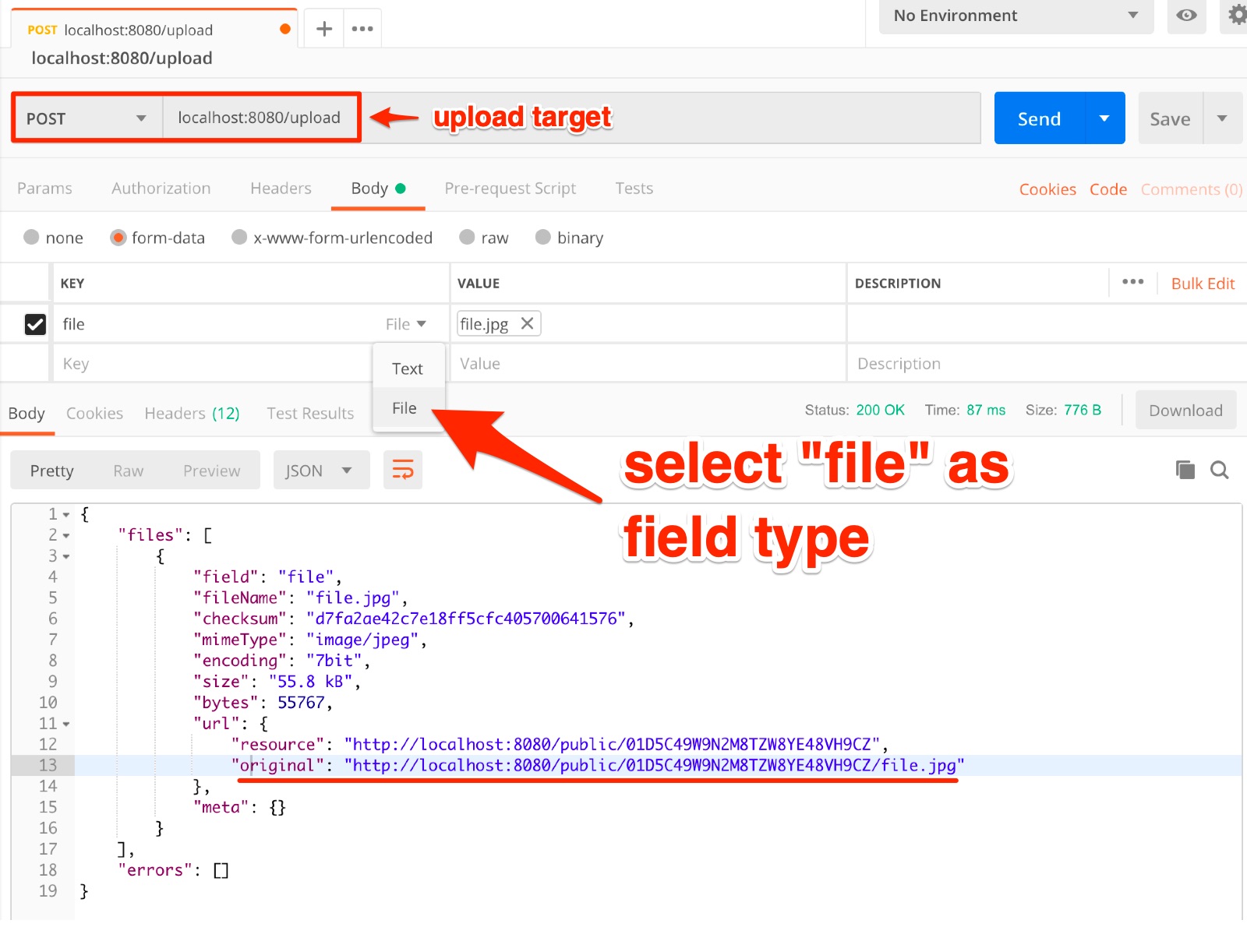
Expected Output
The /upload endpoint returns a list of files that have been succesfully uploaded,
and a list of errors that might have happened along the way.
Here is an example of a standard response body:
{
    "files": [
        {
            "field": "file",
            "fileName": "file.jpg",
            "space": "public",
            "uuid": "01D5C49W9N2M8TZW8YE48VH9CZ",
            "checksum": "d7fa2ae42c7e18ff5cfc405700641576",
            "type": "image/jpeg",
            "encoding": "7bit",
            "size": "55.8 kB",
            "bytes": 55767,
            "url": {
                "original": "http://localhost:8080/public/01D5C49W9N2M8TZW8YE48VH9CZ/file.jpg"
            },
            "meta": {}
        }
    ],
    "errors": [
        {
            "type": "file",
            "success": false,
            "field": "f1",
            "fileName": "elisa.txt",
            "uuid": "f1",
            "space": "public",
            "encoding": "7bit",
            "mimeType": "text/plain",
            "bytesReceived": 1340,
            "bytesWritten": 1340,
            "tempPath": "/Users/marcopeg/dev/marcopeg/stuffer/data/stuffer/uploads/2019-02-17/public__f1__elisa.txt",
            "metaPath": null,
            "errors": [
                {
                    "type": "checksum",
                    "message": "checksum validation failed",
                    "details": null
                }
            ],
            "deleted": true
        }
    ]
}
Handling Errors
As you can see the errors list refers to the files tha failed to upload.
Inside each file data there is the errors list that contains informations about what
went wrong with that specific file.
File Url
The resulting URL of the file is a combination of:
{baseUrl}/{space}/{uuid}/{fileName}
Upload Space
The file space depends on the authenticated user.
You can control this information with the header Authentication with content Bearer xxx
where the xxx is your account's secret token. Read more about authentication
If no authentication is provided and the anonymous upload feature is active, the
uploads end up in a public space. You can control the actual name by setting an
environment variable:
UPLOAD_PUBLIC_SPACE=custom-value
Upload UUID
Each file that you upload is provided with a randomly generated universal unique id. If you try to upload the same file twice, you will generate multiple copies of it.
If you run Stuffer with
NODE_ENV=developmentthe uuid will be generated out of the file name so to avoid to create thousands of files. It's an intended development behaviour and you should familiarize with the differences in production.
If you explicitly want to override a previously uploaded file you can provide a
custom UUID using a form field named: {uploadField}_uuid.
fileField: f1           bynary...
uuidField: f1_uuid      myCustomId
NOTE: a custom id is strictly alphanumeric and can not contain spaces.
You may need this feature in 2 scenarios:
- you need to calculate the file url before the upload happens, hence you can not rely on automatically generated ids
- you explicitly want to override a previously uploaded file. In this case be careful to send the very same file name or orphan files may generates in your storage
NOTE: During development the automatically generated uuid equals to the file name. This is intended to generate fewer upload folders and make your life easier :-)
Upload Name
You can rename a file while uploading it by passing a {uploadField}_name field
containing the desired name.
A custom name should only contain a-zA-Z-_. No spaces or non standard characters are
allowed for compatibility reasons.
Upload Checksum
In order to verify a correct upload you can provide an optional md5 checksum of the
file as custom field name {uploadField}_checksum.
When this information is provided, it will be checked as post-upload validation step. In case the validation fails, the file will be marked ad error and deleted from the storage layer.
Upload Meta Data
You can provide a JSON meta data object as custom field {uploadField}_meta. Consider
this some kind of "cookies for uploads".
In this file you can provide informations that can be used at download time.
As example you could provide a list of accepted resize requests, so that when somebody tries to download you resized image, a validation can take place.
Anyway, the informations that you provide in this field depends a lot on the upload and download modifiers that you setup in your stuffer instance.